
Skip to content
Download Driving Licence

Download Driving Licence

Get Information about Driving Licence, Rc Book

  • Home
  • How-ToExpand
    • Driving LicenceExpand
      • DL Status
      • Download Driving Licence
      • Find DL Number
      • Check e-challan
      • Renewal Driving Licence
      • Duplicate Driving Licence
      • Change Address on Driving Licence
      • Renew Expired Learner Licence
    • Vehicle ServicesExpand
      • Check RC Status
      • Download RC book
      • Update RC Book Mobile Number
      • Duplicate RC Book
  • RTO Exam
  • Contact Us
  • About Us
Download Driving Licence
Get Information about Driving Licence, Rc Book

Vahan RC Status – RC Status Check by Vehicle Number

You can check your vehicle RC book status by vehicle number online using a Parivahan website. if you applied for new, renew or update rc book and want to check application status, you can check online or offline, if you want to check offline then need to visit your RTO office and ask them. The owner of the vehicle must have the RC book, all the information about the vehicle is in the RC book.

Check RC Status

RC Status
Parivahan Website

Parivahan website is very helpful for vehicle owner, using of parivahan can check RC status at home.

How to Check RC Status by Vehicle Number?

If you want to check vahan rc status online, then read this article, this article explains to you step by step with image.

Check RC Status Steps:

  • Open official website of Parivahan
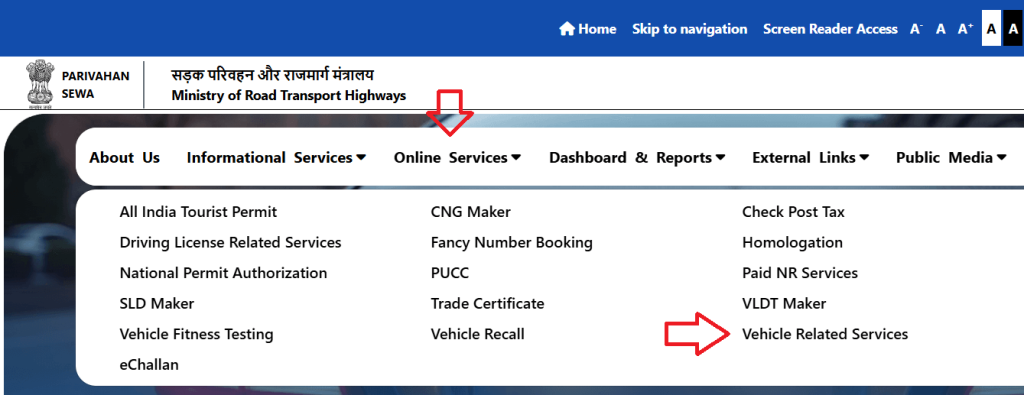
    • first open Parivahan portal and select main menu to Online Services to Vehicle Related Services.
  • Select Your State
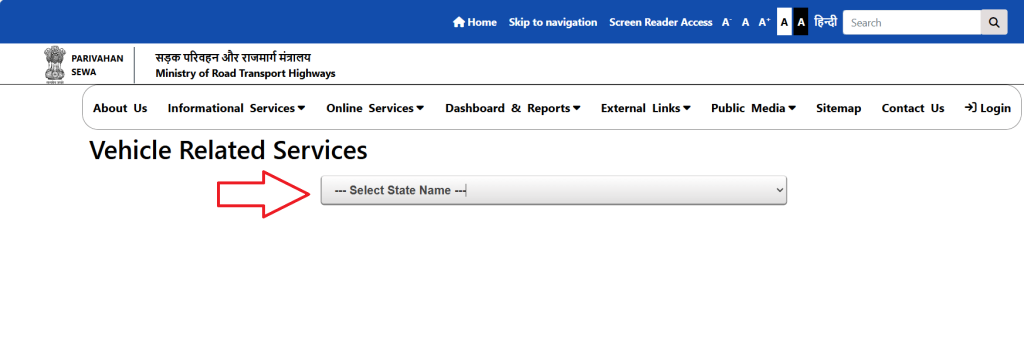
    • Select your state from drop down and select your RTO.
  • Select Application status
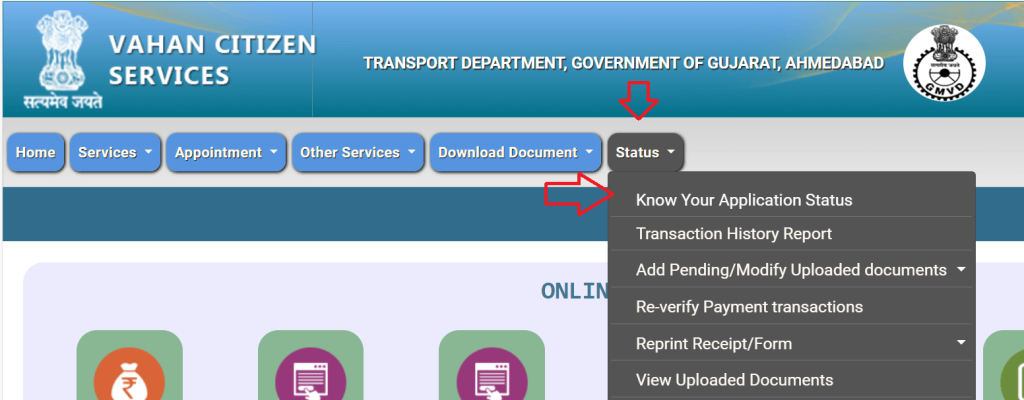
    • Select from top menu to Status to Know Your Application Status.
check rc status
  • Enter details
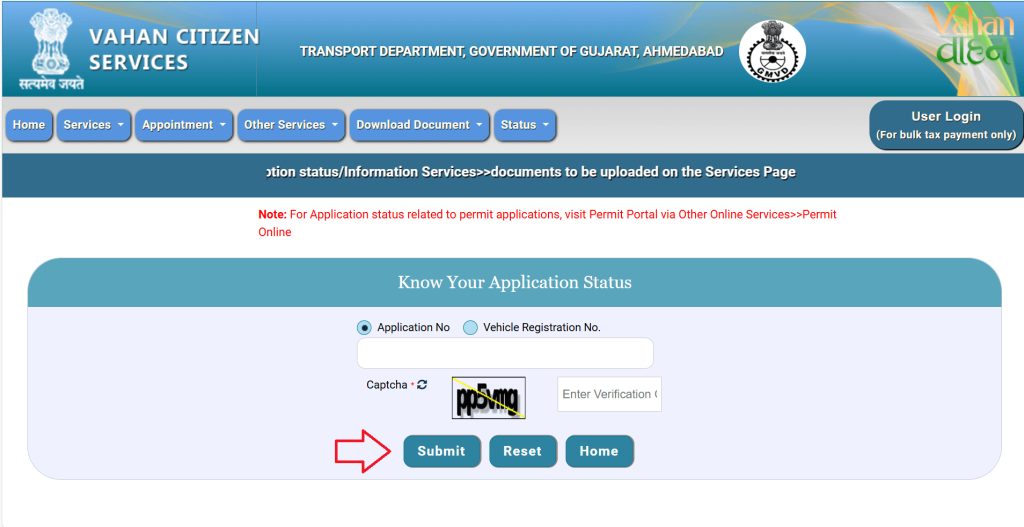
    • Enter your application number or vehicle registration number and captcha code.
check rc status
  • Click on Submit button
    • Now click on submit button and your application status on screen.

Frequently Ask Questions (FAQ)

What does “No record found” mean in RC status?

It means your vehicle data is not yet uploaded in the central Vahan database. it takes some time.

My RC is newly issued, why is the status not updated?

New RCs take 2–7 days to update in the Vahan central database. Check again after 48 hours or visit RTO if it takes longer.

Why is my RC showing “Pending at RTO”?

This means some paperwork or approval is still pending.

How long does it take for RC to update in Parivahan?

Generally, 2 weeks after registration. For older vehicles, it may take longer if data migration is pending.

Can I check RC status without chassis number?

Yes, basic RC status can be checked with only the registration number.

About Us

On DownloadDrivingLicence.com, we Guide you to Sarathi Parivahan, driving licences, and vehicle-related services with step by steps process.

support@downloaddrivinglicence.com

Site Link

Disclaimer

Privacy Policy

Terms & Condition

Contact Us

About Us

Top Link

  • DL Status
  • Check echallan
  • Find DL Number
  • Renewal Driving Licence
  • RTO Exam

Disclaimer: This website is for informational and educational purposes only.
We are not affiliated with Parivahan Sewa, MoRTH, NIC, or any government authority. For official driving licence applications, payments, or updates, always visit the respective government-approved portals.

© 2026 Download Driving Licence. All Rights Reserved.

Scroll to top
  • Home
  • How-To
    • Driving Licence
      • DL Status
      • Download Driving Licence
      • Find DL Number
      • Check e-challan
      • Renewal Driving Licence
      • Duplicate Driving Licence
      • Change Address on Driving Licence
      • Renew Expired Learner Licence
    • Vehicle Services
      • Check RC Status
      • Download RC book
      • Update RC Book Mobile Number
      • Duplicate RC Book
  • RTO Exam
  • Contact Us
  • About Us
Search